

Connecting with Bol.com
Step 1. Retrieve your API credentials from bol.com
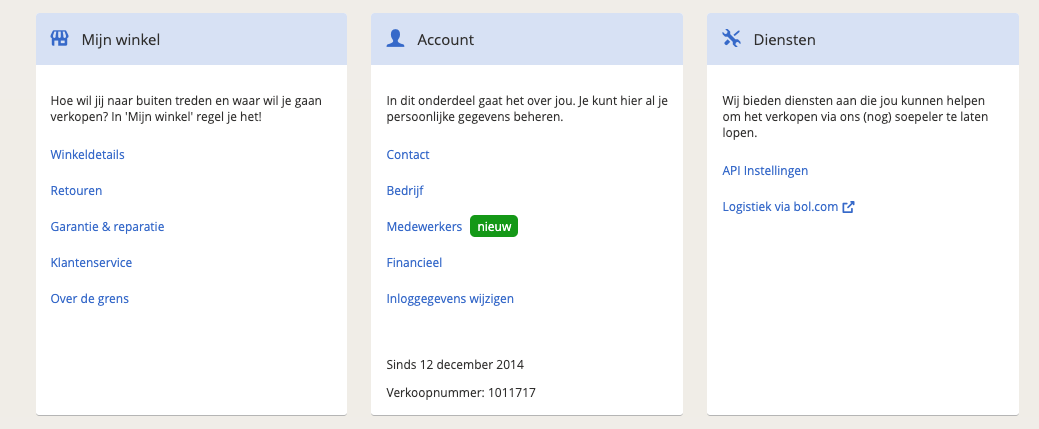
To link a bol.com shop you first need to add your API credentials to the Bol.com middleware. Log in to your bol.com shop and, from the account menu in the top right, choose Instellingen (Settings).
On the settings page, look for API Instellingen under the Diensten (Services) heading.
On that page you'll find your credentials under Client credentials. Copy the Client ID and Client secret, you'll need to enter both in the Bol.com middleware in the next step.
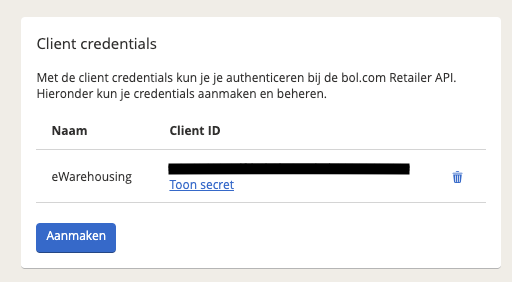
Example of what the client credentials look like (these are sample values and will not work on a live or acceptance environment):
- Client ID:
35e21430-1avd-r432-4fza-ab211456721 - Client secret:
ACDERn5zaFAACeES2TJrOaE2e3jyRjOe23WSZ70NpC9ToCc2aaUY4u5lI-K0ykO34r6z6LFua2DzDao7f3fFXg
Step 2. Contact eWarehousing to finalize the connection
After retrieving your Client ID and Client secret, contact eWarehousing to finalize the connection. Provide them with the following information and they will take care of the rest:
- Your Client ID
- Your Client secret
- Your bol.com shop name